CLOSED BETA · EARLY ACCESS
Make better music. Finish it faster.
ALCHMY helps you hear what your track needs, figure out what to do next, and make the changes that move it forward. Right inside Ableton.
bar 65 · drop
real audio ctx
WHY IT MATTERS · 01
Make better music than you could alone.
You do not need to know why the drop feels small. ALCHMY reads what is in your Set, names what it finds, and makes the move a seasoned producer would make when you ask for it. You decide what to ask for.
WHY IT MATTERS · 02
Get there in a fraction of the time.
No bouncing, no exporting stems, no explaining your whole track first. Ask, by typing or by voice, and ALCHMY works from what is already in your Set — the tracks, clips, devices and mixer it can read.
HOW IT WORKS
Connect, read, ask, change.
An Ableton Control Surface script, a read of your Set, and a local analysis pass over your samples. Everything ALCHMY says traces back to something it read.
Connect
ALCHMY connects to your open Live Set through its Ableton Control Surface script — tracks, clips, devices, mixer, markers — so it knows exactly what you are working with.
your Set, not your screen · no screenshots
Read
Tempo, key and scale, the tracks and clips, the devices and their settings, the MIDI notes it looks at. Facts from your Set first, opinions after.
Ask
Type or speak what you want — a loop, a filter, a tempo, a new track, an arrangement. ALCHMY explains what it will do in terms of what it read, and asks when it cannot be sure what you mean.
you decide what to ask for
Change
Ask, by typing or by voice, and ALCHMY makes the change in your Set and tells you what it did. Then it re-reads your Set to show whether the change landed.
it changes only what you asked for · Live’s Edit ▸ Undo takes it back, step by step
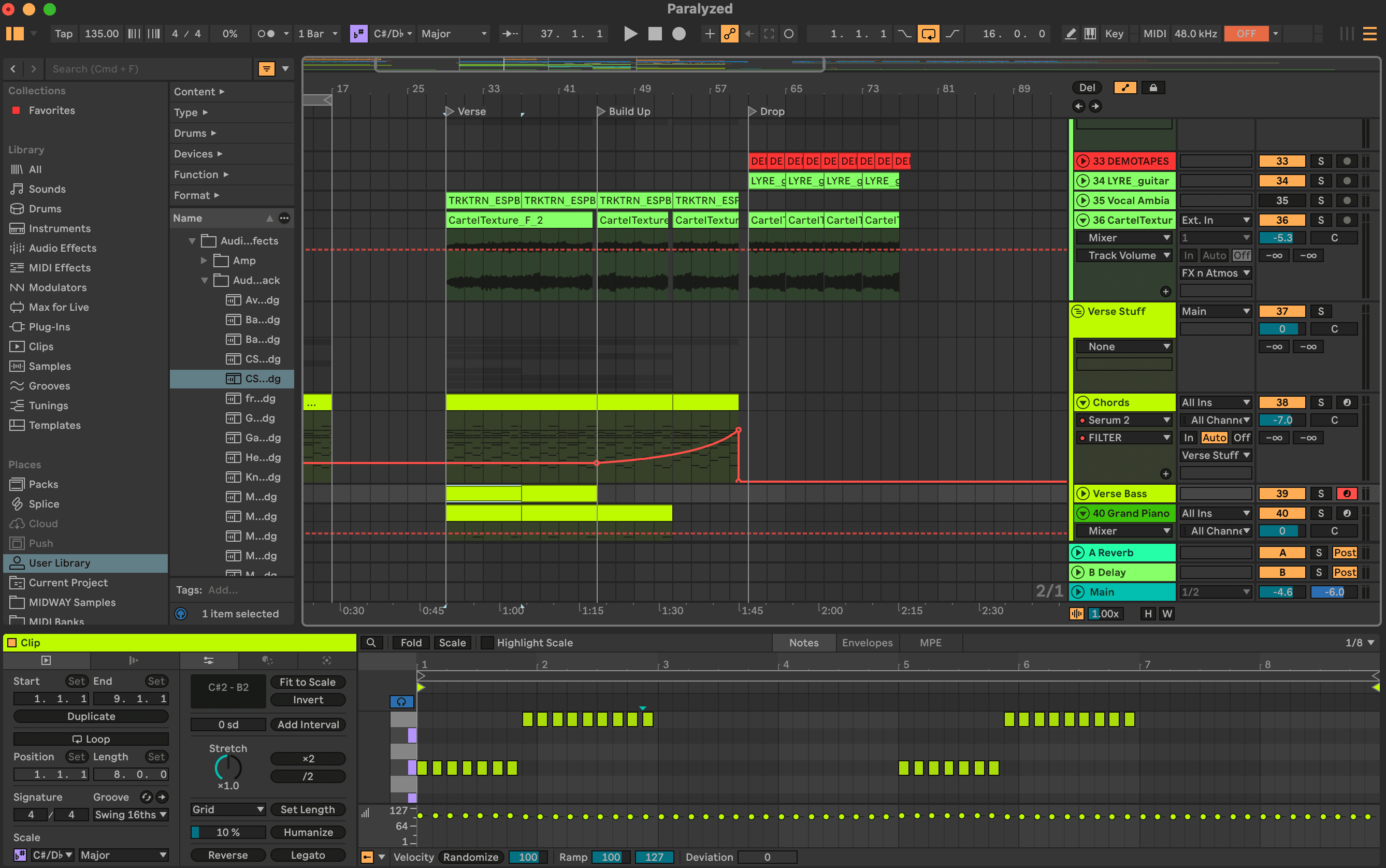
Analyzing bars 65–72...
held: nothing written outside bars 65–72
PRIVACY
Your session stays your session.
Your samples are analysed on your Mac. When you ask a question, what leaves is your request, the recent conversation and the details of your Live Set that ALCHMY read — never your project’s audio, your stems or your project file.
Read the full Privacy Policy →- NO SCREEN CAPTURE
- ALCHMY reads your open Live Set through its Ableton Control Surface script. It takes no screenshots and needs no Screen Recording permission.
- LOCAL ANALYSIS
- Your samples are analysed on your Mac — tempo, key, loudness — and the sample audio never leaves it.
- ON REQUEST ONLY
- Nothing about your music is sent while you work. When you ask, out goes your request, the recent conversation, the details of your Live Set it read (names, tempo, mixer and device settings, the MIDI notes it looked at) and the names and locations of samples it found — never your project’s audio. A spoken request goes to OpenAI only to become text.
- WRITES ON REQUEST
- ALCHMY changes your Live Set when you ask it to, and tells you what it did. It has no undo of its own: Live’s Edit ▸ Undo takes a change back, sometimes in more than one step. Work on a copy of a Set you care about.
FAQ
The questions producers actually ask.
- Will it change my project?
- Only when you ask it to. ALCHMY changes your Live Set when you ask it to — a loop, a filter, a tempo, a new track — and tells you what it did. There is no separate approval step and ALCHMY has no undo of its own, so use Live’s Edit ▸ Undo (sometimes more than once) and work on a copy of a Set you care about.
- Do I need to know how to mix?
- No. ALCHMY reads what is in your Set, explains it in plain language, and makes or explains the change you ask for, one step at a time.
- Will my tracks start sounding generic?
- It starts from what is actually in your Set, not from a genre preset. You decide what to ask for, and Live’s Edit ▸ Undo takes its changes back (sometimes more than once).
- What if it is wrong?
- ALCHMY tells you what it read in your Set and what it changed, so you can check it in Live. When it cannot be sure what you mean, it asks instead of guessing — and it is a beta, so it can still be wrong.
- Does it touch my audio?
- No. ALCHMY talks to Live through an Ableton Control Surface script and never processes or uploads your project’s audio. Playback stays Live’s alone.
CLOSED BETA · INVITES IN BATCHES
Join the Waitlist
Invites sent in small batches